

Leisure Glen Homeowners Association
Fiber Upgrade
1. Do I have to upgrade my Optimum service to fiber?
The short answer is NO, but…if you choose not to upgrade your Optimum service to fiber now, your account will be flagged as complete. If you have a problem in the future and the only recourse is to upgrade your service to fiber after the upgrade contract is closed, there may be an additional charge.
2. How should I respond when the Optimum Sales department calls to arrange an appointment to upgrade my service to fiber?
If you get a call from the Optimum Sales department to make an appointment to upgrade your service to fiber, tell them “No thank you, I am covered under a Multiple Dwelling Unit agreement. Your service team will be scheduling my upgrade.”
3. What is the procedure to get the new fiber installed?
You will receive a flyer from your block captain with all the details and a special telephone number to call to make an appointment once your section has been selected for installation.
See item 11 for online scheduling.
4. Is there any additional charge or fee to upgrade to fiber?
No. The upgrade to the fiber service is free, and there are no additional charges once your service has been upgraded to fiber.
5. Do I need a Smart TV to get this upgrade?
No, you do not need a Smart TV to get the fiber upgrade. However, your TV must be able to use HDMI cables in order to receive the new streaming video input. If your TV cannot accept this type of cable, you will NOT be able to use the new streaming cable boxes and therefore cannot get the upgrade.
6. Will Optimum make a new hole in my siding for the fiber?
If Optimum can’t reuse an existing hole to bring the fiber cable into your home, it may be necessary to make a new small entry.
7. What happens to my existing cable boxes, wiring and remotes?
Your old cable boxes will be replaced with new, smaller “streaming” boxes, each with its own remote. Each remote can only be used with the streaming box it is paired with. Once the service has been upgraded, the technician will take back the old cable boxes and their remotes. The old coax cables that were run in your home will no longer be needed.
The technician will go over all the changes and give a brief demonstration on how to use the new equipment.
8. I’m a snowbird and will be away for 5 months. Can I schedule the upgrade when I get back?
Yes. As long as you let us know that you are a snowbird, and that you want the upgrade when you return, we will hold a spot for you.
9. Are there any tutorials on how to use the new streaming service?
YES! Click here for videos on how to set up the service, using the remote, apps, and more.
Or here for remote features.
10. Will there be any functional changes when coax connected cable box is replaced with the new fiber connected streaming cable box?
Yes – There are several:
1). The first noticeable change is the elimination of a clock display on the much smaller streaming box. You will have to provide a clock near the TV if you wish to have time available.
2). If you previously had a caller’s telephone number displayed on your TV screen, this feature is no longer available. The streaming service does not support this feature.
3). While watching a live TV program, you will longer be able to pause the program, resume viewing the program or rewind the program to review/replay an earlier segment. The streaming box has no local buffering capability as did the coax cable box and therefore does not support these features. If you have added the optional Cloud DVR feature to your package (formerly multi-room DVR), these capabilities may be implemented by simultaneously watching while recording the program.
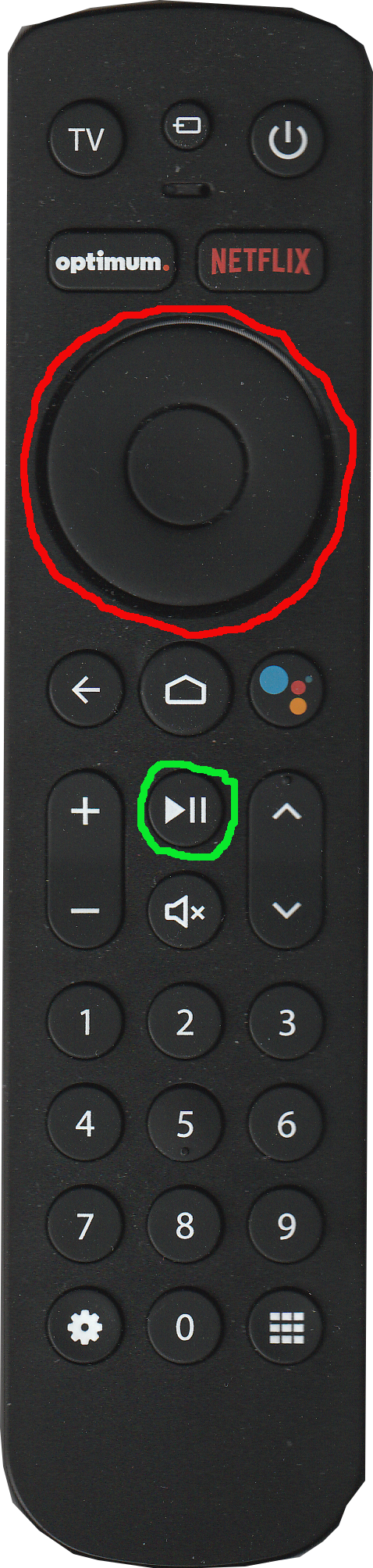
To pause the live broadcast, hit the SELECT KEY (outlined in RED) or the PAUSE/PLAY button (outlined in GREEN). To continue the broadcast hit the same button again.
11. Latest Fiber Update.
Click here for the latest email newsletter
12. Since I migrated to the Fiber Network my displayed phone time keeps changing, usually about four (4) hours ahead. Is there anything I can do about this?
This solution has worked for several residents who have Panasonic phone systems. The approach may also work for other phone systems. On the base station go through the menus items to the area that allows setting the time. In that area there is a menu option that allows selection of automatic or manual mode. Make sure the manual mode is selected, then input the correct local time and exit. Ensure the correct time is being displayed on the base station and any remote handsets.
13. Exactly what is included in the bulk service agreement that we have here in Leisure Glen.
Our agreement includes 1-Gateway6 modem/router, 1- Wifi extender, 1- Streaming device, phone service and 300 mbps Internet speed at the modem. Things that are additional (i.e. programming packages, additional equipment Samsung tv boxes with the Coax system or Streaming boxes with the fiber, extenders or DVR services) are NOT part of the bulk agreement and are billed at the going rates. The going rate for the Samsung box is $14 and for the streaming box $12, these prices went into effect November 29th, 2024. All additional equipment, not part of the bulk services agreement are subject to rate increases.
14. How to re schedule an appointment
I had an appointment for the upgrade to the fiber system but it did not happen, now when I try to get a new appointment, the system won’t let me put in a new date – help!
To put in a new date, you must first cancel the original date. To due that, go to the website, https://slotted.co/leisure-glen find your name, you may have to go to the top of the page and click on show past dates to find your name, click on your name and enter the same email address that you used to schedule the original date.
Once you do that your name, and your original appointment should change to Select Here. Once that happens, you can re schedule a new appointment date.
Email additional questions to:
Testimonials
I had the fiber network installed and it went smoothly and the Optimum workers were neat, polite, and helpful.

Brigette
Designer
We had the fiber update on Tuesday a.m. and it went well. The tech was very pleasant and competent and it took about 1 hour and 20 minutes. Everything is working well (at this point in time). Thank you for the advice and help via mail these past few weeks.
Kathleen
Designer
Our installation went smoothly. The installer -Dave was very helpful and friendly. A really nice guy!
The Candelaria’s
Designer
Brian was here hooking me up. He was fantastic. Very painless !
Linda
Designer
Hello Ron,
I wanted to let you know that we are upgraded and had a wonderful experience! Nick was in and out very quickly this morning. He was extremely courteous, neat and helpful!
Thank you and the entire committee!
Have a great Saturday 😀
Diane and John 👠i
Designer
The fiber installation by technician Dave went smoothly. He is a real pro and explained the process as he worked.
Just great.
There was an issue with the extender, which he promptly resolved by replacing it the following day.
Brian
Designer
Designer
So our Fiber install was amazing! Dave was the installer, he was neat and walked us through everything! Thanks,
Eileen & Gary”
Designer
Designer
Our Optimum Fiber Optics took place yesterday. We are happy to report that the entire process went extremely smoothly and that we are extremely pleased with the results. Our installation was scheduled for 8:00 a.m. and Brian, our technician, called us to tell us he would arrive shortly-and he did. The entire installation took approximately 2 hours. Brian was extremely courteous and efficient. He clearly explained every step of the process to us as he went along and made a point of making sure that all our various devices were properly connected to the new network and working properly. Before he left, Brian provided us with all of the necessary paperwork and instructions on who to contact in the event that we ran into any issues. Today, everything continues to work perfectly. We wish to thank all of you for your hard work and due diligence in making sure that Optimum fullfills its obligations to the residents of our community.
Thank you,
Mary and Bill
Designer
Optimum was at our home this morning to do the fiber migration. Our technician, Brian, was patient, knowledgeable and helpful.
He answered all our questions and set up our cell phones, tablet and printer for wifi as well as 3 streaming devices for our tvs. Brian even helped us to install the Pluto tv and Peacock apps on our living room tv. He also went through instructing my husband and myself on how to use the remote. He left us the phone numbers of the Optimum supervisors who are available 7 days a week should we encounter any issues.
Ron, we want to thank you and the HOA Board for all your hard work to make this an easy process. We know that your efforts made this all possible. We greatly appreciate it.
Linda and Vincent
Designer

Views: 0